Technical SEO is an important part of search engine optimization. It helps search engines crawl, understand, and index your website properly. Even if your content is good, poor technical SEO can stop your website from ranking well on Google.
The good thing is that technical SEO is not as difficult as many people think. By making small improvements, you can improve your website performance and user experience.
In this blog, you will learn what technical SEO is and simple ways to optimize your website.
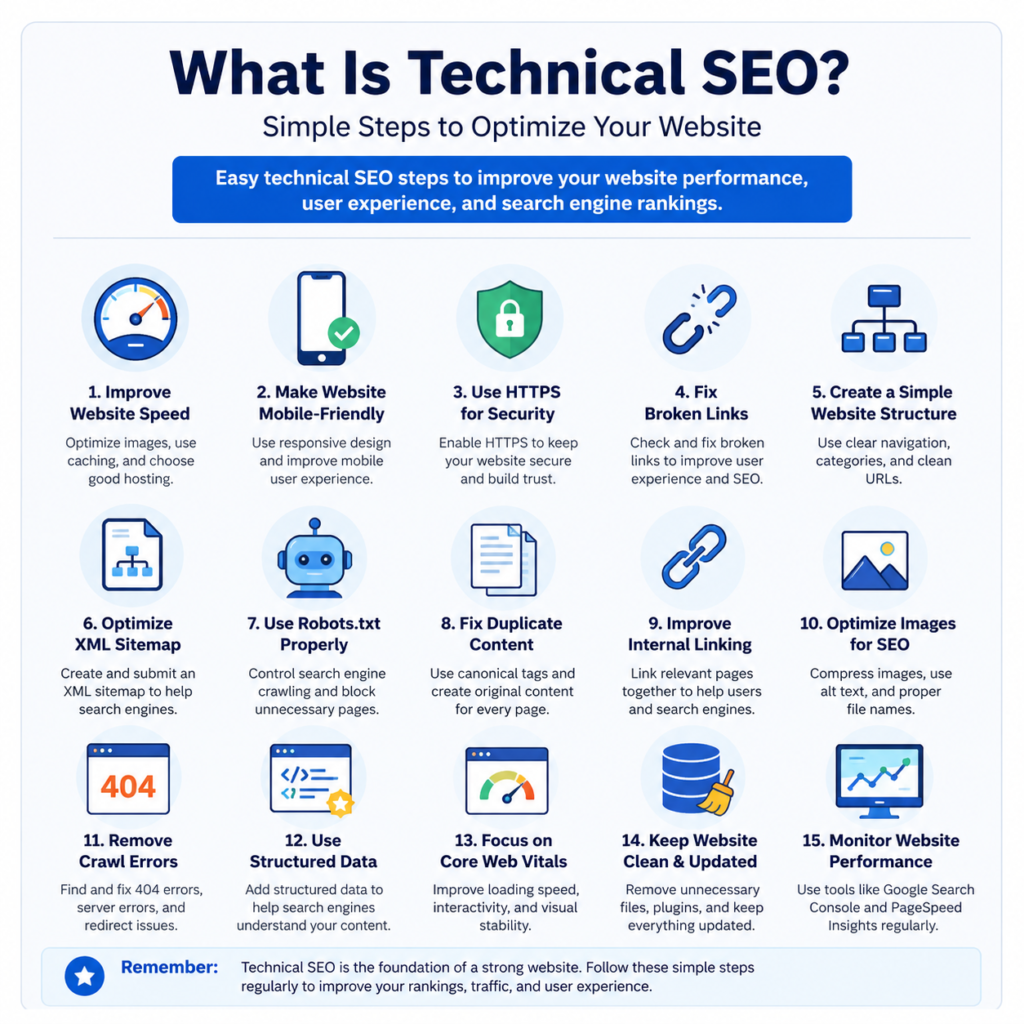
What Is Technical SEO?
Technical SEO means improving the technical parts of your website so search engines can easily access and understand it.
It focuses on:
- Website speed
- Mobile friendliness
- Website security
- Website structure
- Broken links
- Indexing issues
Technical SEO helps both users and search engines.
Why Technical SEO Is Important
A website with poor technical SEO may face many problems like:
- Slow loading speed
- Poor rankings
- Broken pages
- Bad user experience
- Pages not appearing on Google
Good technical SEO helps your website work smoothly and rank better.
Benefits of Technical SEO
Improves Website Speed
Fast websites keep visitors happy and reduce bounce rate.
Helps Google Crawl Your Website
Technical SEO makes it easier for search engines to find your pages.
Improves User Experience
Visitors enjoy websites that are fast and easy to use.
Supports Better Rankings
Google prefers technically strong websites.
Reduces Website Errors
It helps fix broken links and crawl issues.
Step 1: Improve Website Speed
Website speed is very important for SEO.
People usually leave websites that load slowly.
Ways to Improve Website Speed
Use Smaller Images
Large images slow down websites.
Compress images before uploading them.
Remove Extra Plugins
Too many plugins can slow your website.
Only keep important plugins.
Choose Good Hosting
Fast hosting improves website performance.
Enable Caching
Caching helps pages load faster for visitors.
Step 2: Make Your Website Mobile-Friendly
Most users visit websites using mobile phones.
Your website should work properly on all screen sizes.
Tips for Mobile Optimization
Use Responsive Design
Your website should adjust automatically on mobile devices.
Use Simple Fonts
Text should be easy to read without zooming.
Avoid Too Many Pop-Ups
Pop-ups can create a poor mobile experience.
Make Buttons Easy to Click
Buttons should not be too small.
Step 3: Use HTTPS for Security
HTTPS keeps your website secure.
Secure websites are trusted more by users and Google.
Benefits of HTTPS
Builds Trust
Visitors feel safe on secure websites.
Improves SEO
Google prefers secure websites.
Protects User Data
HTTPS helps protect personal information.
Step 4: Fix Broken Links
Broken links create a bad user experience.
They can also hurt your SEO.
How to Fix Broken Links
Check Links Regularly
Find broken links on your website.
Remove Old Links
Delete links that no longer work.
Update Wrong URLs
Replace incorrect links with correct ones.
Step 5: Create a Simple Website Structure
A clean website structure helps users and search engines.
Tips for Better Website Structure
Use Simple Navigation
Menus should be easy to understand.
Organize Content Properly
Use categories and subcategories.
Keep URLs Short
Simple URLs are better for SEO.
Good URL Example
- yourwebsite.com/technical-seo-guide
Bad URL Example
- yourwebsite.com/page?id=12345
Step 6: Optimize Your XML Sitemap
An XML sitemap helps search engines find your pages.
Benefits of XML Sitemap
Faster Indexing
Google can discover pages quickly.
Better Crawling
Search engines understand website structure better.
Step 7: Use Robots.txt Properly
Robots.txt tells search engines which pages they can crawl.
Why Robots.txt Matters
Controls Search Engine Access
You can block unnecessary pages.
Improves Crawling
Search engines focus on important pages.
Step 8: Fix Duplicate Content
Duplicate content means similar content appears on multiple pages.
This can confuse search engines.
Ways to Avoid Duplicate Content
Write Unique Content
Always create original content.
Use Canonical Tags
Canonical tags show the main version of a page.
Step 9: Improve Internal Linking
Internal links connect pages on your website.
Benefits of Internal Linking
Helps Users Navigate
Visitors can easily find related content.
Improves Crawling
Search engines discover more pages.
Increases Time on Website
Users may spend more time reading related blogs.
Step 10: Optimize Images for SEO
Images improve website design, but large images slow down websites.
Image SEO Tips
Compress Images
Smaller images load faster.
Add Alt Text
Alt text helps search engines understand images.
Use Proper File Names
Use simple and descriptive names.
Good Example
- technical-seo-guide.jpg
Bad Example
- IMG12345.jpg
Step 11: Fix Crawl Errors
Crawl errors happen when search engines cannot access pages.
Common Crawl Errors
404 Errors
This happens when pages are missing.
Server Errors
Server problems can stop pages from loading.
Redirect Errors
Too many redirects can confuse search engines.
Step 12: Focus on Core Web Vitals
Core Web Vitals measure website user experience.
Google uses them for ranking.
Important Core Web Vitals
Loading Speed
Pages should load quickly.
Visual Stability
Page content should not move suddenly.
Fast Interaction
Buttons and links should respond quickly.
Common Technical SEO Mistakes
Ignoring Mobile Optimization
A poor mobile website hurts rankings.
Using Too Many Plugins
Extra plugins slow down websites.
Slow Website Speed
Slow websites create poor user experience.
Poor Website Structure
Confusing navigation makes websites difficult to use.
Forgetting Broken Links
Broken links affect SEO and user experience.
Best Tools for Technical SEO
Google Search Console
Helps monitor website performance and errors.
Google PageSpeed Insights
Checks website speed and performance.
Screaming Frog
Helps find technical SEO problems.
GTmetrix
Measures website loading speed.
Simple Technical SEO Checklist
- Improve Website Speed
- Make Website Mobile-Friendly
- Use HTTPS Security
- Fix Broken Links
- Optimize Images
- Create XML Sitemap
- Improve Internal Linking
- Fix Crawl Errors
- Use Clean URLs
- Monitor Website Performance
Final Thoughts
Technical SEO is important for every website. It helps search engines understand your content and improves user experience.
You do not need advanced technical knowledge to start improving your website. Simple changes like improving speed, fixing broken links, using HTTPS, and optimizing for mobile devices can make a big difference.
Start with small improvements and continue learning step by step. A technically strong website has a better chance of ranking higher on Google and getting more traffic.