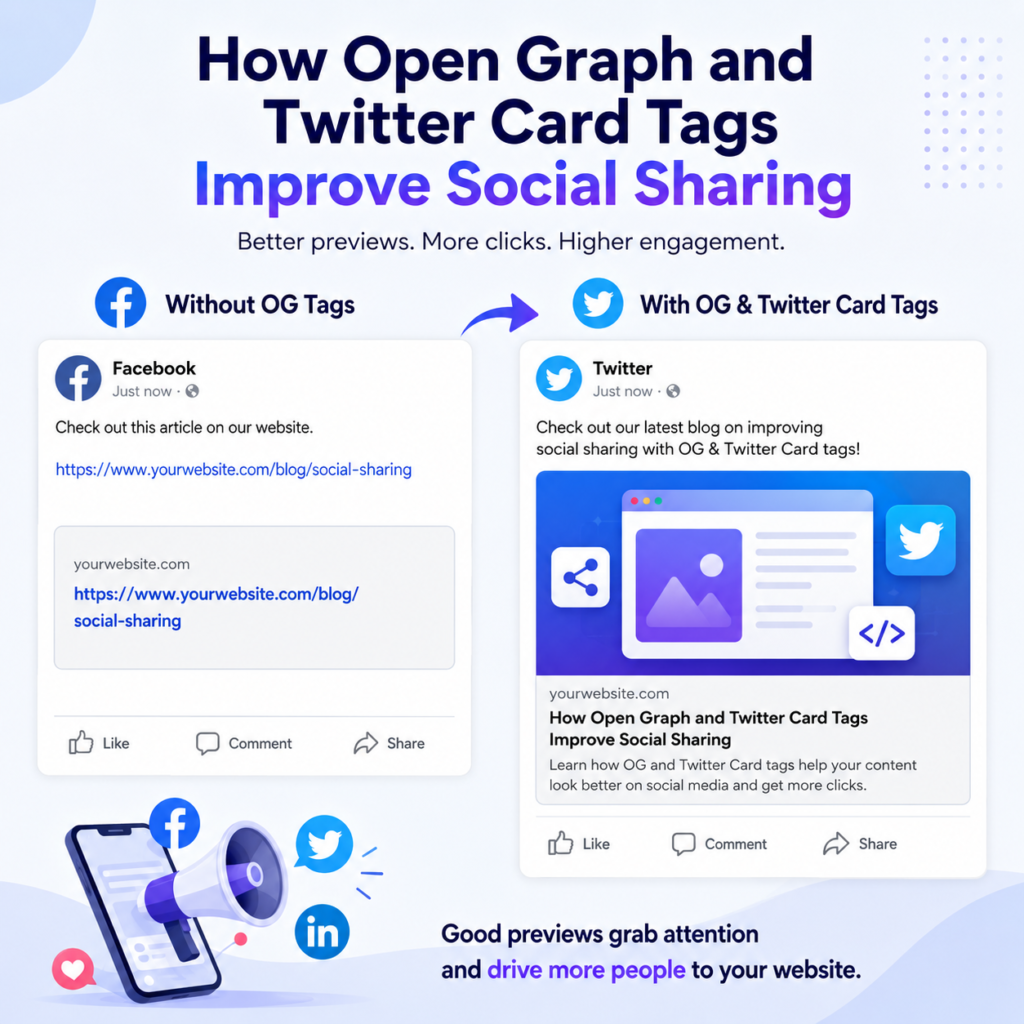
When you share a website link on Facebook, LinkedIn, X (formerly Twitter), or other social media platforms, you may notice that some links look much better than others. Some show a beautiful image, a clear title, and a short description, while others only display a plain URL with little or no information.
The difference is usually because of Open Graph (OG) tags and Twitter Card tags.
These meta tags help social media platforms understand your webpage and create attractive link previews. A good preview can encourage more people to click your link, visit your website, and share your content with others.
In this guide, we will learn what Open Graph and Twitter Card tags are, how they work, why they are important, and how you can add them to your website in simple and easy language.
What Are Open Graph Tags?
Open Graph tags are special HTML meta tags added inside the <head> section of a webpage.
They tell social media platforms what information should appear when someone shares your webpage.
Instead of allowing Facebook or LinkedIn to guess your page title or image, Open Graph tags let you choose exactly what should be displayed.
These tags help create a professional and attractive social media preview.
What Are Twitter Card Tags?
Twitter Card tags work in a similar way, but they are designed specifically for X (formerly Twitter).
When someone shares your webpage on X, these tags control how the shared link appears.
They allow you to display:
- A title
- A short description
- A featured image
- Additional information depending on the card type
Without Twitter Card tags, your shared link may not look appealing, which can reduce clicks.
Why Are These Tags Important?
Imagine you have written an excellent blog post.
If the shared preview only shows a plain URL, many people may ignore it.
However, if the preview includes a high-quality image, an interesting title, and a useful description, more people are likely to click the link.
This is why Open Graph and Twitter Card tags are so valuable.
They make your content more attractive on social media.
How Social Media Platforms Use These Tags
Whenever someone shares your webpage, social media platforms scan your page for these meta tags.
If they find them, they use the information to create a rich preview.
Usually, the preview contains:
- Featured image
- Page title
- Short description
- Website name
This happens automatically without requiring extra work from the person sharing your content.
Benefits of Open Graph and Twitter Card Tags
Better First Impression
People often decide within a few seconds whether they want to click a link.
A clean and attractive preview creates a strong first impression.
Higher Click-Through Rate
A well-designed preview attracts more attention.
More attention often leads to more clicks.
Better Brand Recognition
Using your own images, titles, and descriptions helps people recognize your website.
Over time, visitors become familiar with your content and brand.
More Social Shares
People are more likely to share content that looks professional.
An attractive preview encourages others to repost your articles.
Better User Experience
Visitors immediately understand what your page is about before clicking the link.
This creates a smoother browsing experience.
What Information Do Open Graph Tags Include?
The most common Open Graph tags are:
og:title
This is the title displayed when your webpage is shared.
Keep it short, clear, and interesting.
og:description
This provides a brief summary of your webpage.
It should encourage users to click without giving away everything.
og:image
This specifies the image that appears in the social media preview.
Choose a high-quality image that represents your content.
og:url
This tells social media platforms the correct page URL.
It helps prevent duplicate previews.
og:type
This describes the type of content.
Examples include:
- Website
- Article
- Blog post
- Product
- Video
Common Twitter Card Tags
Twitter Card tags include similar information.
Some common ones are:
twitter:card
Defines the type of Twitter Card.
The most popular option is “summary_large_image.”
twitter:title
Displays your page title.
twitter:description
Shows a short summary.
twitter:image
Displays the featured image.
twitter:site
Shows the official X account associated with your website.
How Open Graph Tags Improve Social Sharing
Open Graph tags make shared links look complete and professional.
Instead of displaying random content, they show exactly what you want visitors to see.
For example, when someone shares your cooking recipe, the preview can display:
- A delicious food image
- The recipe title
- A short description
- Your website name
This makes the link much more attractive.
How Twitter Card Tags Improve Social Sharing
Twitter users scroll quickly through their feeds.
An eye-catching preview helps your content stand out.
A large image combined with an interesting title can significantly increase engagement.
Instead of blending into the timeline, your shared post becomes easier to notice.
Do These Tags Improve SEO?
Open Graph and Twitter Card tags are not direct ranking factors for search engines.
However, they can support your overall digital marketing strategy.
They help by:
- Increasing social media engagement
- Bringing more visitors to your website
- Improving brand visibility
- Encouraging more shares
More traffic and better user engagement can indirectly benefit your website over time.
How to Add Open Graph Tags
Adding Open Graph tags is simple.
They should be placed inside the <head> section of your webpage.
Most website platforms make this easy.
If you use WordPress, many SEO plugins automatically generate Open Graph tags.
You can also add them manually if needed.
How to Add Twitter Card Tags
Twitter Card tags are also added inside the <head> section.
Many SEO plugins generate both Open Graph and Twitter Card tags together.
This saves time and ensures consistency across social media platforms.
Best Practices
To get the best results:
- Use a unique title for every page.
- Write a clear description.
- Choose a high-quality featured image.
- Keep branding consistent.
- Update tags whenever your content changes.
- Test shared links before publishing.
- Make sure your pages are mobile-friendly.
Following these practices helps create better-looking previews.
Common Mistakes to Avoid
Many website owners make simple mistakes, such as:
- Forgetting to add Open Graph tags
- Using blurry or low-quality images
- Writing descriptions that are too long
- Using duplicate titles
- Missing Twitter Card tags
- Choosing images with incorrect dimensions
- Forgetting to update tags after editing content
Avoiding these mistakes improves your social sharing experience.
Why Every Website Should Use These Tags
Whether you run a personal blog, business website, online store, or news website, Open Graph and Twitter Card tags can make a noticeable difference.
Every shared link becomes more attractive and informative.
This helps build trust with visitors and increases the chances that they will click your content.
Since social media plays an important role in bringing visitors to websites, these tags are a simple but valuable addition.
Final Thoughts
Open Graph and Twitter Card tags may seem like small pieces of code, but they have a big impact on how your website appears on social media.
They help control your page title, description, and featured image, making every shared link look more professional and engaging. Although these tags do not directly improve search engine rankings, they can increase clicks, encourage more shares, strengthen your brand, and drive more traffic to your website.
If you want your content to stand out on Facebook, LinkedIn, X, and other social platforms, adding Open Graph and Twitter Card tags is one of the easiest improvements you can make. By taking a few minutes to set them up correctly, you can create better social sharing previews and give your audience a stronger reason to visit your website.