If you have a website or blog, then you probably want people to find it on search engines like Google. But with millions of websites online, getting traffic is not easy.
This is where SEO becomes important.
SEO stands for Search Engine Optimization. It helps websites rank better on search engines and attract more visitors naturally.
SEO is mainly divided into three parts:
- On-Page SEO
- Off-Page SEO
- Technical SEO
In this blog, we will understand On-Page SEO in simple and easy language.
What Is On-Page SEO?
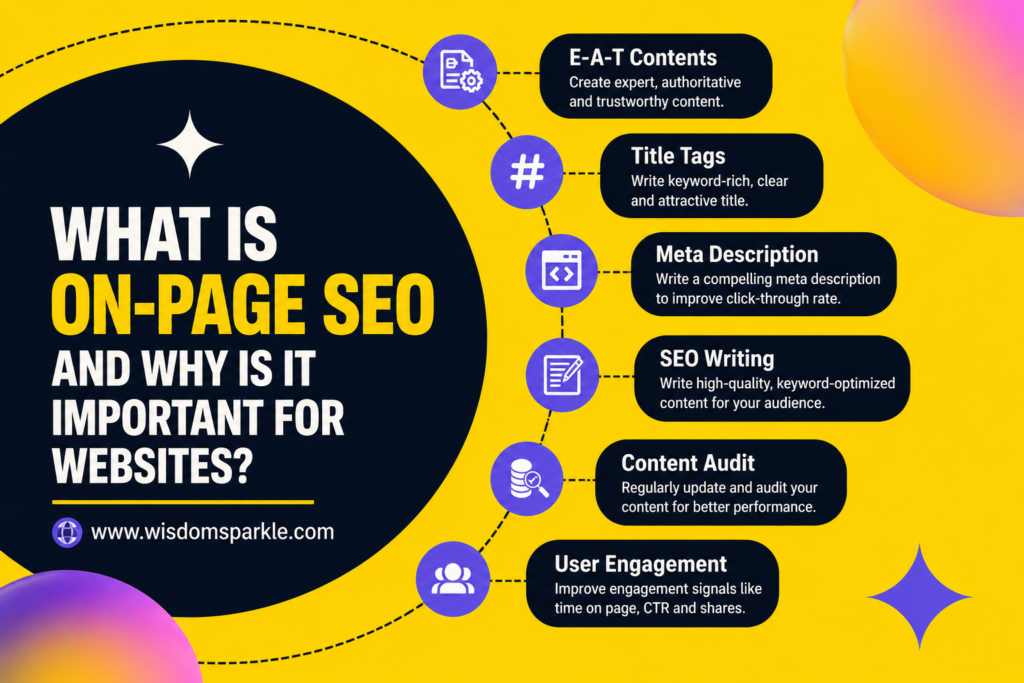
On-Page SEO means optimizing the pages and content of your website so search engines can understand them better.
In simple words, everything you do inside your website to improve rankings is called On-Page SEO.
Things Included in On-Page SEO
- Writing quality content
- Using keywords properly
- Adding headings
- Optimizing images
- Improving website speed
- Writing meta titles and descriptions
- Adding internal links
On-Page SEO helps both users and search engines understand your content easily.
Why Is On-Page SEO Important?
Many people create websites but do not get traffic because they ignore On-Page SEO.
Even if your content is good, your website may not rank properly without optimization.
Helps Your Website Rank Higher
Search engines try to show the best results to users.
When your website is optimized properly, search engines can easily understand:
- What your page is about
- Which keyword you are targeting
- Whether your content is useful or not
This improves your chances of ranking on the first page.
Brings Organic Traffic
Organic traffic means visitors who come from search engines without paid ads.
Good On-Page SEO can bring free traffic daily.
For example, if someone searches:
- “best skincare tips”
- “how to rank on Google”
- “easy fitness tips”
your website may appear in search results if your content is optimized correctly.
Improves User Experience
On-Page SEO is not only for search engines. It also improves user experience.
When your website has:
- Proper headings
- Easy navigation
- Fast loading speed
- Simple content
- Mobile-friendly design
people enjoy using your website more.
Builds Website Trust
When visitors find useful and well-organized content, they start trusting your website.
Over time, your website becomes more professional and authoritative.
Main Elements of On-Page SEO
Keyword Research
Keywords are the words people type on search engines.
Examples:
- “What is On-Page SEO”
- “SEO tips for beginners”
- “How to improve website ranking”
Choosing the right keyword is very important before writing a blog.
Tips for Keyword Research
- Choose low-competition keywords
- Use long-tail keywords
- Focus on search intent
- Use keyword research tools
You can use tools like:
High-Quality Content
Content is one of the most important parts of SEO.
Good content should be:
- Helpful
- Original
- Easy to understand
- Informative
- Well-structured
Always write for humans first, not only for search engines.
Tips for Writing Better Content
- Use simple language
- Write short paragraphs
- Add examples
- Avoid difficult words
- Make content engaging
Proper Heading Structure
Headings organize your content properly and improve readability.
H1 Heading
The H1 heading is your main title.
Example:
What Is On-Page SEO and Why Is It Important for Websites?
H2 Heading
H2 headings are used for the main sections of your blog.
Example:
Benefits of On-Page SEO
H3 Heading
H3 headings are used for subtopics inside H2 headings.
Example:
Improves Website Ranking
Title Tag Optimization
The title tag is the clickable title shown on search engines.
A good title tag helps increase clicks and improve rankings.
Tips for Good Title Tags
- Include your main keyword
- Keep it short and clear
- Make it attractive
- Avoid keyword stuffing
Example:
“What Is On-Page SEO and Why Is It Important for Websites?”
Meta Description Optimization
A meta description is the short text shown below the title in search results.
It tells users what your page is about.
Tips for Meta Descriptions
- Use keywords naturally
- Keep it simple and attractive
- Write around 150–160 characters
- Encourage users to click
URL Optimization
A good URL should be short, clean, and easy to understand.
Bad URL Example
website.com/page?id=123
Good URL Example
website.com/on-page-seo-guide
Simple URLs are better for both users and search engines.
Internal Linking
Internal links connect one page of your website to another page.
Example:
Linking your SEO article to your digital marketing article.
Benefits of Internal Linking
- Helps users explore more content
- Improves website structure
- Helps search engines crawl pages
- Increases page views
Image Optimization
Images make blogs more attractive and engaging.
But large images can slow down your website.
Tips for Image Optimization
- Compress image size
- Use proper file names
- Add alt text
- Use high-quality images
Mobile-Friendly Design
Today, most people browse websites on smartphones.
If your website is not mobile-friendly, visitors may leave quickly.
A Mobile-Friendly Website Should
- Load properly on phones
- Have readable text
- Be easy to navigate
- Work smoothly on all screen sizes
Website Speed Optimization
People do not like slow websites.
A fast website improves:
- User experience
- SEO rankings
- Visitor engagement
Ways to Improve Website Speed
- Compress images
- Use good hosting
- Remove unnecessary plugins
- Reduce large files
Keyword Placement
Using keywords correctly is very important.
Places Where You Should Add Keywords
- Title
- Introduction
- Headings
- Meta description
- URL
- Content
Always use keywords naturally.
Do not overuse them.
Common On-Page SEO Mistakes
Keyword Stuffing
Using the same keyword too many times makes content look spammy.
Always write naturally.
Copying Content
Copied content can harm your rankings.
Always create original content.
Ignoring Mobile Users
Your website should work properly on smartphones.
Slow Website Speed
Slow websites lose visitors quickly.
Poor Content Structure
Content without headings becomes difficult to read.
Best On-Page SEO Tips for Beginners
Focus on User Experience
Think about what users want to read.
Helpful content performs better.
Write Quality Content Regularly
Consistency is important in SEO.
Publish blogs regularly.
Keep Updating Old Articles
Update old content with fresh information.
This helps maintain rankings.
Use Images and Examples
Visual content increases engagement.
Make Content Easy to Read
Use:
- Short sentences
- Bullet points
- Simple words
- Proper headings
Difference Between On-Page SEO and Off-Page SEO
On-Page SEO
Things done inside the website:
- Content optimization
- Keywords
- Headings
- Meta tags
- Internal links
Off-Page SEO
Things done outside the website:
- Backlinks
- Social sharing
- Guest posting
- Brand mentions
Both are important for better rankings.
How Long Does On-Page SEO Take to Work?
SEO takes time.
Sometimes results appear in a few weeks, while competitive keywords may take months.
Things That Affect SEO Results
- Keyword competition
- Content quality
- Website authority
- Backlinks
- User experience
The key is consistency.
Keep improving your content and website regularly.
Final Thoughts
On-Page SEO is one of the most important parts of growing a website successfully.
Without proper optimization, even good content may struggle to rank on search engines.
The good thing is that On-Page SEO is beginner-friendly and easy to learn step by step.
Start With Simple Improvements
- Write quality content
- Use proper keywords
- Add headings
- Improve website speed
- Make your site mobile-friendly
Small changes can create big results over time.
If you stay consistent and focus on helping users, your website can slowly grow and attract more traffic naturally from search engines.