If you have a website, blog, online store, or business, then you have probably heard the word SEO many times. SEO is one of the most important things for growing a website and getting traffic from Google.
Many beginners think SEO is very difficult or technical, but the truth is SEO can be simple if you learn the basics step by step.
In simple words, SEO helps your website appear on Google when people search for something related to your content, products, or services.
For example, if someone searches:
- “Best fitness tips”
- “Hair care routine”
- “Digital marketing course”
Google shows websites related to those searches. SEO helps your website rank higher in those results.
In this blog, we will learn how to do SEO in a very simple way, especially for beginners.
What Is SEO?
SEO stands for Search Engine Optimization.
It is the process of improving your website so it can rank higher on search engines like Google.
The better your SEO is, the more people can find your website online.
Simple Example of SEO
Understanding SEO with an Example
Suppose you wrote a blog about healthy hair tips.
If your SEO is good, your blog may appear on Google when someone searches:
- “How to make hair healthy naturally”
This can bring free visitors to your website.
Why SEO Is Important
SEO is important because it helps people discover your website naturally without paid ads.
Benefits of SEO
Increases Website Traffic
Better rankings bring more visitors to your website.
Builds Trust
People trust websites that appear on the first page of Google.
Improves Brand Awareness
More visibility means more people know about your business.
Helps Generate Sales and Leads
SEO can help businesses get customers online.
Gives Long-Term Results
Good SEO can continue bringing traffic for months or years.
How Search Engines Work
Search engines like Google try to show the best and most useful content to users.
Google checks many things before ranking a page.
Things Google Looks At
Content Quality
Google checks whether your content is useful and informative.
Keywords
Search engines analyze whether your content matches user searches.
Website Speed
Fast websites provide a better user experience.
Mobile Friendliness
Websites should work properly on mobile devices.
Backlinks
Google checks whether trusted websites link to your content.
Types of SEO
SEO is divided into different categories.
On-Page SEO
On-page SEO means improving things inside your website.
Examples of On-Page SEO
Using Proper Keywords
Adding relevant keywords naturally in your content.
Writing Helpful Content
Good-quality content improves rankings.
Optimizing Titles and Headings
Proper headings improve readability and SEO.
Adding Internal Links
Internal links connect one page of your website to another.
Off-Page SEO
Off-page SEO focuses on activities outside your website.
Examples of Off-Page SEO
Backlinks
Links from other websites improve authority.
Social Sharing
Sharing blogs on social media increases visibility.
Guest Posting
Writing blogs for other websites helps build backlinks.
Technical SEO
Technical SEO helps search engines crawl your website properly.
Examples of Technical SEO
Fast Website Speed
A fast-loading website improves user experience.
Mobile-Friendly Design
Your website should work smoothly on phones.
Secure Website
HTTPS security is important for SEO.
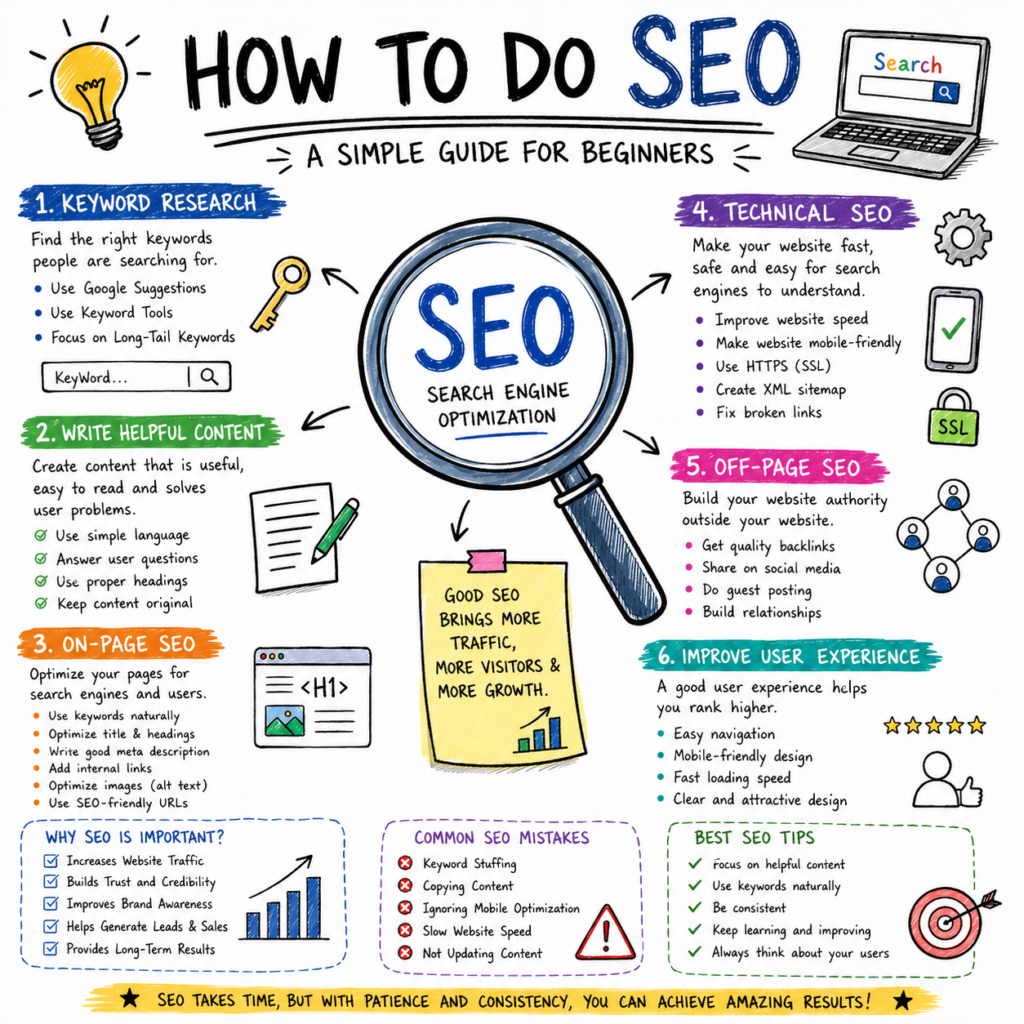
Step-by-Step Guide to Doing SEO
Keyword Research
Keywords are words or phrases people search on Google.
Keyword research helps you understand what users want.
Examples of Keywords
- Healthy hair tips
- Weight loss exercises
- Best SEO tools
Ways to Find Keywords
Use Google Search Suggestions
Google automatically suggests popular searches.
Use Free SEO Tools
Tools like Google Keyword Planner and Ubersuggest can help.
Focus on Long Keywords
Long keywords are easier to rank for.
Example:
Instead of:
- “SEO”
Use:
- “How to do SEO for beginners”
Write Helpful Content
Content is one of the most important parts of SEO.
Google prefers useful and easy-to-read content.
Tips for Writing SEO-Friendly Content
Use Simple Language
Write in an easy and beginner-friendly style.
Answer User Questions
Provide information people are searching for.
Use Proper Headings
Headings improve readability.
Keep Content Original
Avoid copying content from other websites.
Importance of Heading Structure in SEO
Proper headings help organize your content clearly.
H2 Headings
H2 headings are used for main sections.
Example of H2
- What Is SEO?
- Why SEO Is Important
H3 Headings
H3 headings are used for subtopics inside H2 sections.
Example of H3
- Benefits of SEO
- Keyword Research
H4 Headings
H4 headings are used for smaller points inside H3 sections.
Example of H4
- Increases Website Traffic
- Builds Trust
Proper heading structure improves user experience and SEO.
Optimize Your Blog Title
The title is the first thing users see on Google.
Tips for Better SEO Titles
Use Main Keywords
Add your target keyword naturally.
Keep Titles Clear
Titles should explain the topic properly.
Make Titles Attractive
Interesting titles increase clicks.
Example of a Good SEO Title
How to Do SEO in 2026: Simple Strategies That Work
Write a Good Meta Description
Meta description is the small text shown below the title on Google.
Tips for Meta Descriptions
Keep It Short
Around 150–160 characters is best.
Add Keywords Naturally
Use important search terms carefully.
Make It Interesting
Encourage users to click your website.
Use SEO-Friendly URLs
URLs should be simple and easy to understand.
Good URL Example
yourwebsite.com/how-to-do-seo
Bad URL Example
yourwebsite.com/page?id=12345
Simple URLs improve both SEO and user experience.
Add Internal Links
Internal links connect pages within your website.
Benefits of Internal Linking
Helps Users Explore More Content
Visitors spend more time on your website.
Improves Website Structure
Search engines understand your site better.
Supports SEO Rankings
Internal linking improves content visibility.
Optimize Images for SEO
Images also help improve SEO.
Tips for Image SEO
Use Proper File Names
Example:
Seo-tips.jpg
Compress Image Size
Smaller images improve loading speed.
Add Alt Text
Alt text helps search engines understand images.
Improve Website Speed
A slow website can hurt rankings and user experience.
Ways to Improve Website Speed
Compress Images
Large images make websites slower.
Use Fast Hosting
Good hosting improves performance.
Remove Unnecessary Plugins
Too many plugins may slow your site.
Make Your Website Mobile-Friendly
Most users now browse websites on mobile phones.
Google also gives importance to mobile-friendly websites.
Features of Mobile-Friendly Websites
Easy Navigation
Users should easily find information.
Fast Loading
Pages should open quickly.
Clean Design
The website should look good on small screens.
Importance of Backlinks
Backlinks are links from other websites to your website.
Google sees backlinks as a sign of trust.
Ways to Get Backlinks
Guest Posting
Write blogs for other websites.
Create Helpful Content
Useful content naturally attracts links.
Share Content Online
Social sharing increases visibility.
Use Social Media for SEO
Social media helps bring visitors and increase content visibility.
Popular Platforms for Sharing Content
Good for blog sharing and engagement.
Useful for visual content promotion.
Helpful for professional content.
Great for driving website traffic.
Common SEO Mistakes Beginners Make
Keyword Stuffing
Using keywords too many times looks unnatural.
Copying Content
Duplicate content can hurt rankings.
Ignoring Mobile Optimization
Poor mobile experience affects SEO.
Slow Website Speed
Slow websites increase bounce rates.
Not Updating Content
Old content should be refreshed regularly.
How Long Does SEO Take?
SEO is a long-term process and does not give instant results.
Factors That Affect SEO Results
Competition
Competitive keywords take more time.
Content Quality
Helpful content performs better.
Website Authority
Trusted websites often rank faster.
Consistency
Regular SEO work improves results over time.
Most websites start seeing improvements within a few months.
Best SEO Tips for Beginners
Focus on Helpful Content
Always create content for users first.
Use Keywords Naturally
Do not force keywords unnaturally.
Be Consistent
SEO requires regular effort and patience.
Keep Learning
SEO changes regularly, so continue learning.
Improve User Experience
Good user experience improves rankings and engagement.
Conclusion
SEO is one of the best ways to grow a website naturally. It helps websites rank higher on Google, attract visitors, and improve online visibility.
For beginners, SEO may look difficult at first, but once you understand the basics, it becomes much easier.
Start with simple steps like:
- Finding good keywords
- Writing helpful content
- Using proper headings
- Improving website speed
- Making your website mobile-friendly
Remember, SEO takes time and consistency. With regular effort and patience, SEO can help your website grow successfully in the long run.