If you want your website to rank better on Google, creating good content is only one part of SEO. Another important part is making sure that every page has its own unique title tag and meta description.
Many website owners accidentally use the same title and description on multiple pages. This is called duplicate metadata, and it can make it harder for search engines to understand which page should appear in search results.
The good news is that this problem is easy to fix. By following a few simple SEO practices, you can make every page unique and improve your website’s overall performance.
In this guide, you’ll learn what duplicate title tags and meta descriptions are, why they matter, how to prevent them, and how to fix them if they already exist.
What Are Title Tags and Meta Descriptions?
Before learning about duplicate metadata, let’s quickly understand these two SEO elements.
A title tag is the clickable title that appears in Google search results and in your browser tab. It tells users and search engines what the page is about.
A meta description is the short summary displayed below the title in search results. Although it is not a direct ranking factor, a good meta description encourages people to click on your page.
Both should clearly describe the content of the page.
What Are Duplicate Title Tags and Meta Descriptions?
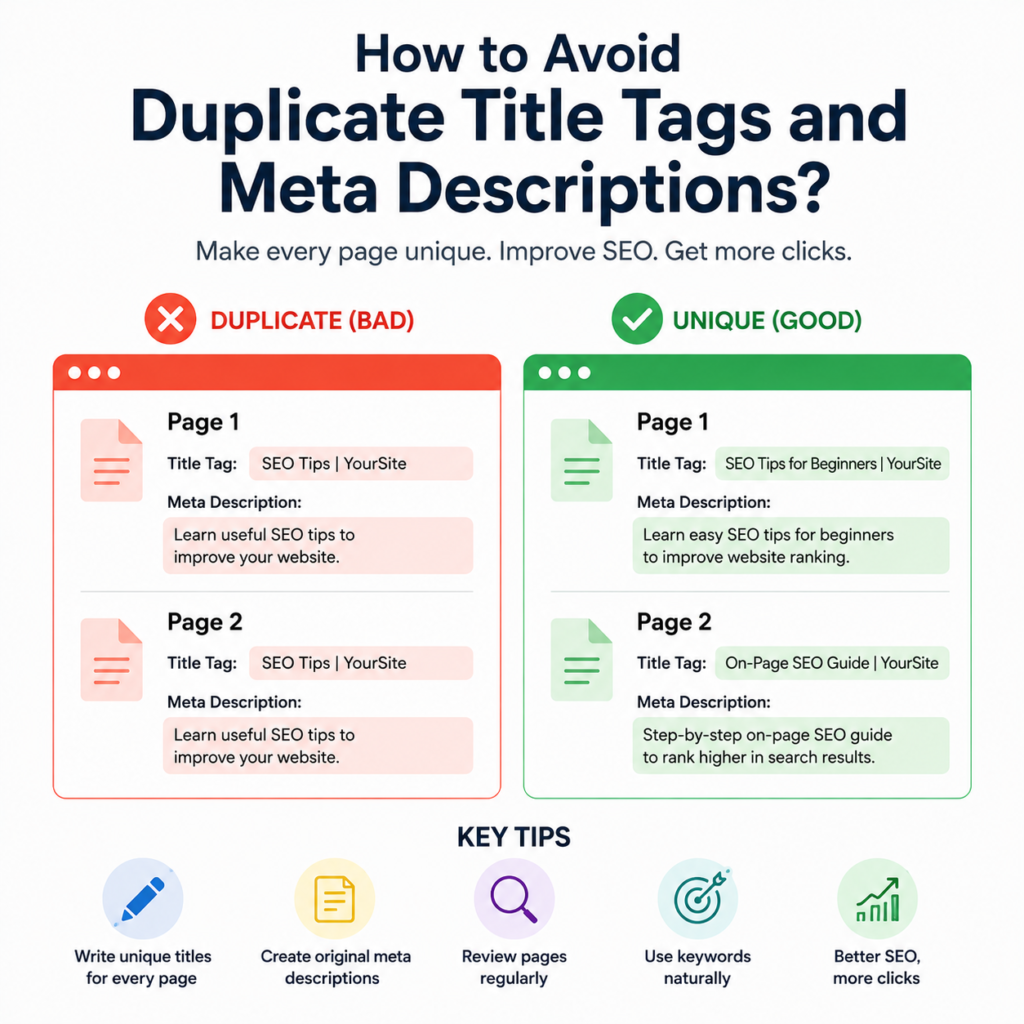
Duplicate title tags happen when two or more pages on your website use exactly the same title.
Duplicate meta descriptions happen when multiple pages have the same description.
For example:
Page 1
Title: SEO Tips | Wisdom Sparkle
Page 2
Title: SEO Tips | Wisdom Sparkle
This creates confusion because both pages look identical to search engines.
The same problem occurs when both pages use the same meta description.
Why Duplicate Metadata Is Bad for SEO
Every page on your website has a different purpose.
One page may explain SEO basics, another may discuss on-page SEO, while another may focus on technical SEO.
If they all have the same title and description, search engines cannot easily understand which page is most relevant.
Duplicate metadata can:
- Confuse search engines.
- Reduce click-through rates.
- Make different pages compete with each other.
- Create a poor user experience.
- Make your website look less organized.
Giving every page its own unique title and description helps avoid these problems.
Key Strategies to Prevent Duplicates
The easiest way to avoid duplicate metadata is to create unique titles and descriptions whenever you publish a new page.
Here are some simple strategies.
Write Every Title Separately
Never copy the title from another page.
Think about what makes the page different and write a title that matches its content.
For example:
Instead of:
SEO Guide | Wisdom Sparkle
Write:
What Is Technical SEO? | Wisdom Sparkle
or
How to Improve On-Page SEO | Wisdom Sparkle
Every title should clearly explain its own topic.
Create Unique Meta Descriptions
Your meta description should summarize only that page.
Avoid copying descriptions between blogs.
A few simple sentences that explain the page are enough.
Remember, every page has something different to offer.
Let the description reflect that.
Focus on One Main Topic Per Page
Each page should focus on one main subject.
When every page has a unique purpose, writing unique titles and descriptions becomes much easier.
Avoid creating multiple pages that cover exactly the same content.
Include Relevant Keywords Naturally
Use the main keyword for that page in both the title and the description.
Do not force keywords repeatedly.
Natural writing is always better than keyword stuffing.
Add Your Brand Name
Many websites include their brand name at the end of every title.
Example:
How to Improve Website Speed | Wisdom Sparkle
This creates consistency while keeping each title unique.
Review Your Website Regularly
As your website grows, duplicate metadata can appear without you noticing.
Check your pages from time to time.
If you find two similar titles or descriptions, update one of them immediately.
Regular reviews help keep your website organized.
How to Fix Duplicate Title Tags
If your website already has duplicate titles, don’t worry.
They can be fixed easily.
Step 1: Find Duplicate Titles
Review your website page by page.
You can also use SEO auditing tools to identify duplicate title tags.
Make a list of all pages with duplicate titles.
Step 2: Rewrite Each Title
Look at the content of each page carefully.
Write a new title that clearly describes that specific page.
Every title should answer one simple question:
“What is this page about?”
If the answer is different, the title should also be different.
Step 3: Add Keywords Naturally
Include the primary keyword for that page.
This helps both users and search engines understand the topic.
Keep the title simple and easy to read.
Step 4: Keep Titles Short
Very long titles may be cut off in search results.
Try to keep titles around 50–60 characters whenever possible.
Short titles are cleaner and easier to understand.
How to Fix Duplicate Meta Descriptions
The process is almost the same.
Read each page carefully.
Write a fresh description that explains what readers will learn.
Avoid copying descriptions from other pages.
A good meta description encourages users to click because it tells them why the page is useful.
Common Mistakes to Avoid
Many beginners unknowingly create duplicate metadata.
Some common mistakes include:
- Copying titles from older blogs.
- Using the same meta description on every page.
- Creating pages with almost identical content.
- Forgetting to update titles after changing content.
- Writing very short or meaningless titles like “Home” or “Page.”
Avoiding these mistakes will improve your SEO over time.
Example of Good and Bad Metadata
Bad Example
Title
SEO Guide | Wisdom Sparkle
Meta Description
Learn about SEO on our website.
This could easily be copied across many pages.
Good Example
Title
How to Improve On-Page SEO for Beginners | Wisdom Sparkle
Meta Description
Learn simple on-page SEO techniques that help improve website rankings, user experience, and search visibility.
The second example clearly describes one specific page.
Tips for Writing Better Metadata
Whenever you create a new page, ask yourself:
- Is this title different from every other page?
- Does the title describe the page clearly?
- Does the description explain what readers will learn?
- Have I included the main keyword naturally?
- Would I click this result if I saw it on Google?
These simple questions help create stronger metadata.
Why Unique Metadata Improves User Experience
Unique titles and descriptions don’t just help search engines.
They also help visitors.
When people search on Google, they read the title and description before clicking.
If every page has a different title and summary, users can quickly choose the page that matches what they need.
This creates a better experience and increases the chances of getting more clicks.
Final Checklist Before Publishing
Before publishing any new page, quickly check:
- Does the page have a unique title?
- Does it have a unique meta description?
- Is the title related to the page?
- Is the description easy to understand?
- Have I avoided copying from another page?
- Does the metadata encourage users to click?
If the answer is yes, your page is ready.
Conclusion
Duplicate title tags and meta descriptions are common SEO problems, but they are also among the easiest to fix. Every page on your website should have its own unique title and description that clearly explain what the page is about.
By writing original metadata, focusing on one topic per page, using keywords naturally, and reviewing your website regularly, you can prevent duplicate metadata and improve your website’s SEO.
Remember, small improvements like unique title tags and meta descriptions can make a big difference in helping search engines understand your content and encouraging users to click on your pages. Over time, these simple SEO practices contribute to better visibility, higher click-through rates, and a stronger website.