If you have ever visited a website that takes a long time to open, you probably did not wait for it to finish loading. Most people leave a slow website within a few seconds. That is why website speed has become one of the most important parts of creating a good website.
Images are often the biggest reason why a webpage becomes slow. Large images look beautiful, but they also take time to load. This is where the idea of lazy loading comes in.
Many website owners ask the same question: Should I use lazy loading, or should I keep normal image loading? Which one is actually better?
The answer depends on how your website is built, but for most modern websites, lazy loading is the better choice because it improves speed and creates a better experience for visitors.
In this blog, let’s understand the difference between lazy loading and normal image loading in simple words.
What Is Normal Image Loading?
Normal image loading is the traditional way of loading images on a webpage.
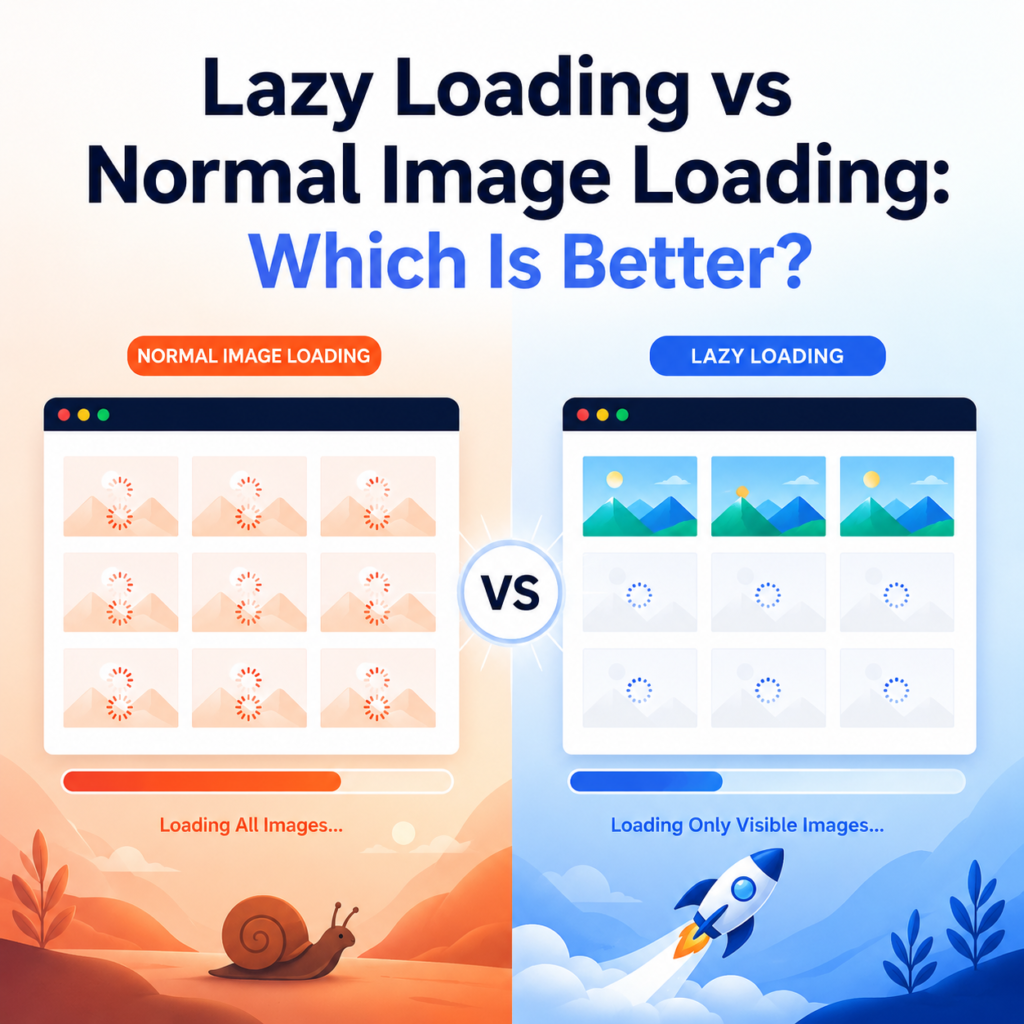
When someone opens your page, the browser starts downloading every image on that page immediately. It does not matter whether the visitor can see those images or not. All images begin loading at once.
For example, imagine you have a blog with 20 images.
Even though the visitor can only see the first two images without scrolling, the browser still downloads all 20 images in the background.
This increases the amount of data that needs to be loaded before the page becomes fully ready.
What Is Lazy Loading?
Lazy loading works differently.
Instead of loading every image at the beginning, it only loads the images that are currently visible on the visitor’s screen.
As the visitor scrolls down, the remaining images load one by one only when they are about to appear.
This means your website loads much less data at the start, making the page appear faster.
Think of it like reading a book.
Instead of opening every page of the book at once, you only open the page you are currently reading. When you turn to the next page, only then do you open it.
That is exactly how lazy loading works.
The Main Difference
The biggest difference is simple.
Normal image loading
- Loads every image immediately.
- Uses more internet data at the beginning.
- Can slow down large webpages.
Lazy loading
- Loads only visible images first.
- Loads other images when needed.
- Makes pages open faster.
Why Website Speed Matters
People today expect websites to open quickly.
If your page takes several seconds to load, many visitors may leave before reading your content.
A fast website offers many benefits.
- Visitors stay longer.
- Pages feel smoother.
- Mobile users enjoy a better experience.
- Bounce rates become lower.
- Search engines are more likely to favor fast websites.
Since images are usually one of the largest files on a webpage, improving the way they load can make a noticeable difference.
Benefits of Lazy Loading
Faster Page Loading
This is the biggest advantage.
Instead of downloading every image at once, your website only loads what the visitor actually needs.
The page becomes visible much faster.
Better User Experience
People like websites that respond quickly.
Visitors can begin reading your content almost immediately instead of waiting for dozens of images to load.
This creates a smoother browsing experience.
Saves Internet Data
Not every visitor scrolls to the bottom of your page.
If someone leaves after reading the first few sections, the remaining images are never downloaded.
This saves internet data for your visitors, especially those using mobile connections.
Better Performance on Mobile Devices
Many users visit websites using smartphones.
Mobile networks may sometimes be slower than broadband connections.
Lazy loading reduces the amount of data downloaded at the beginning, helping pages load faster on mobile devices.
Can Improve SEO
Website speed is one of the factors that can affect search engine rankings.
While lazy loading alone will not guarantee higher rankings, it helps improve page performance, which supports better SEO.
A faster website also encourages visitors to spend more time on your pages.
Are There Any Disadvantages?
Lazy loading is useful, but it is not perfect.
There are a few things to keep in mind.
Images Load Only When Needed
If someone’s internet connection is very slow, they may briefly notice images appearing while scrolling.
Usually, this lasts only a moment.
Wrong Setup Can Cause Problems
If lazy loading is not implemented correctly, search engines or browsers may not load some images properly.
Using modern website platforms and following recommended methods usually avoids these issues.
When Is Normal Image Loading Better?
Normal image loading still has its place.
Some images should load immediately because they are important.
For example:
- Website logo
- Main banner image
- Product image at the top of the page
- Featured image in the first screen
These images are seen instantly when the page opens, so loading them immediately provides a better experience.
When Should You Use Lazy Loading?
Lazy loading is ideal for images that appear further down the page.
Examples include:
- Blog images
- Photo galleries
- Long articles
- Product listings
- Portfolio pages
- News websites
- Recipe websites
- Educational websites
If visitors need to scroll before seeing the images, lazy loading is usually the best option.
These are often called below-the-fold images, meaning they are not visible until the user scrolls down the page.
Which One Uses Less Server Resources?
Lazy loading often reduces the amount of data transferred during the initial page load.
If many visitors leave your page before scrolling to the bottom, those lower images are never requested.
This can reduce unnecessary bandwidth usage and improve overall website efficiency.
Does Lazy Loading Work on Every Website?
Almost every modern website can benefit from lazy loading.
Many popular content management systems and website builders now include it by default.
You can also enable it using plugins, themes, or built-in browser features.
For most website owners, implementing lazy loading is easier today than it was a few years ago.
A Simple Example
Imagine two websites.
Website A loads 30 images immediately.
Website B loads only the first three images.
As you scroll, Website B loads the remaining images one by one.
Which website feels faster?
Most people will notice that Website B becomes usable much sooner because it does not waste time downloading images the visitor cannot yet see.
That is the advantage of lazy loading.
Lazy Loading and SEO
Many people worry that search engines cannot find lazy-loaded images.
Modern search engines understand properly implemented lazy loading.
As long as your website follows current web standards, search engines can usually crawl and index those images without problems.
It is also important to:
- Use descriptive image file names.
- Add meaningful alt text.
- Compress images before uploading.
- Choose modern image formats where possible.
- Avoid making image files larger than necessary.
Lazy loading works best when combined with these good image optimization practices.
Which One Should You Choose?
For most websites, a combination of both methods gives the best results.
Load the important images at the top of the page normally.
Use lazy loading for images that appear lower down the page.
This approach keeps the first screen fast while reducing unnecessary downloads for the rest of the page.
It offers visitors a smooth experience without sacrificing performance.
Final Thoughts
When comparing Lazy Loading vs Normal Image Loading, there is no one-size-fits-all answer, but lazy loading is the better option for most modern websites.
Normal image loading downloads every image as soon as the page opens. This can slow down websites with many images, especially on mobile devices or slower internet connections.
Lazy loading waits until an image is actually needed before downloading it. This improves page speed, reduces data usage, and creates a better experience for visitors.
The smartest approach is to use both wisely. Keep important images at the top of the page loading normally, and implement lazy loading for below-the-fold images and media. This simple change can make your website faster, more user-friendly, and better prepared for modern SEO practices.
Even though it may seem like a small improvement, faster-loading pages can leave a better impression on your visitors and encourage them to stay on your website longer.