If you want your website to perform well in search engines, one of the first things you should pay attention to is the title tag. Many beginners spend a lot of time writing blog content but forget about creating a strong and unique title tag. As a result, their pages may not get as many clicks as they deserve.
A unique title tag helps both search engines and users understand what your page is about. It also increases the chances of someone clicking on your page when it appears in search results.
In this guide, you’ll learn what a unique title tag is, why it matters, how to write one, and some simple templates you can use for different types of web pages.
What Is a Title Tag?
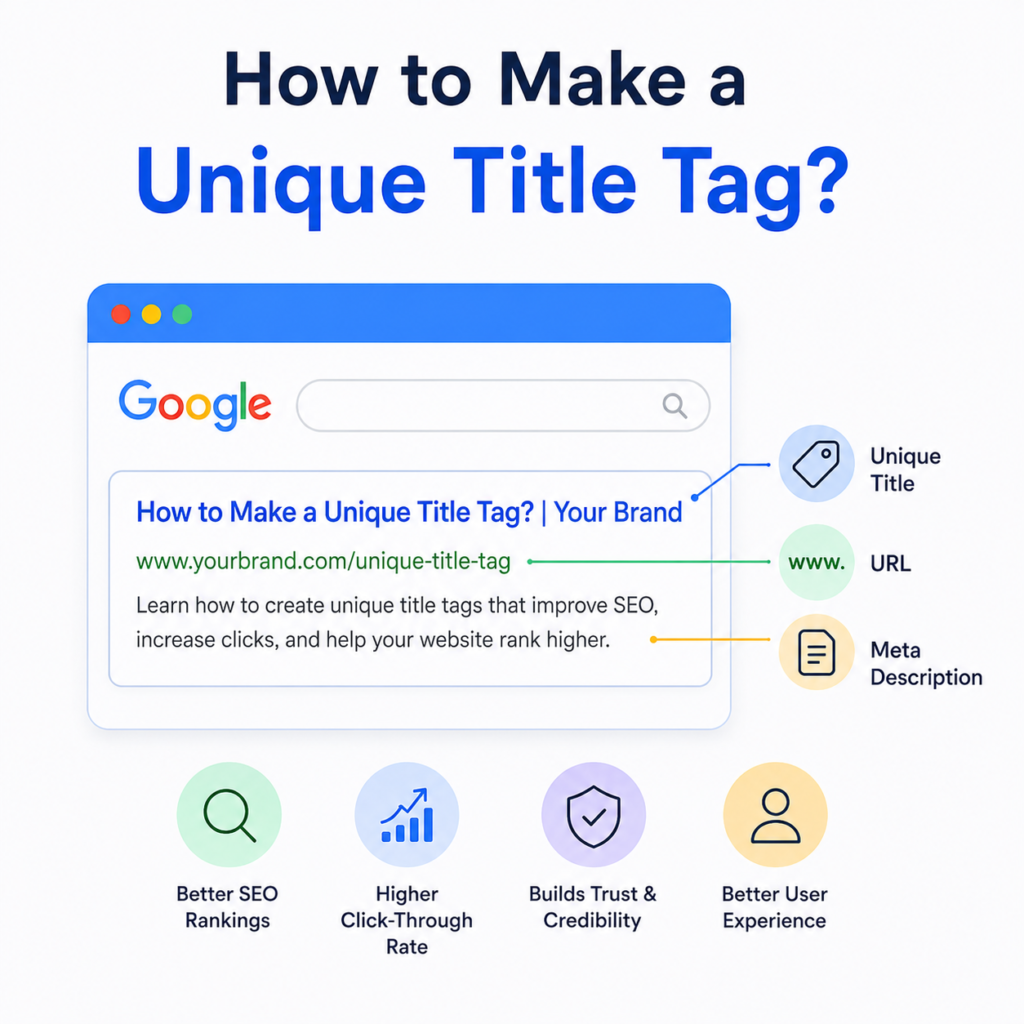
A title tag is the title that appears in Google search results and in the browser tab when someone opens your page.
For example, if you search for “SEO Tips,” you will see different blue clickable titles. Those are title tags.
A title tag gives users a quick idea of what they will find after clicking your page.
What Is a Unique Title Tag?
A unique title tag means that every page on your website has its own different title.
Each page should describe its own content instead of using the same title across multiple pages.
For example:
Good Titles
- Beginner’s Guide to SEO | Wisdom Sparkle
- What Is On-Page SEO? | Wisdom Sparkle
- How to Improve Website Speed | Wisdom Sparkle
Each title is different because every page covers a different topic.
Poor Titles
- Home | Wisdom Sparkle
- Home | Wisdom Sparkle
- Home | Wisdom Sparkle
Using the same title for different pages makes it difficult for search engines to understand your content.
Why Uniqueness Matters
Every page on your website serves a different purpose. Some pages explain a topic, while others sell products or provide services.
If multiple pages have the same title tag, search engines may struggle to understand which page should appear in search results. This can reduce your visibility and make it harder for users to find the right page.
Unique title tags help by:
- Making each page easier for Google to understand.
- Increasing the chances of ranking for different keywords.
- Improving click-through rates because users know exactly what the page offers.
- Avoiding duplicate title issues.
- Creating a better experience for visitors.
In simple words, every page deserves its own unique identity.
How to Make a Unique Title Tag
Writing a unique title tag is easier than many people think.
Start with the Main Keyword
Include the primary keyword naturally at the beginning whenever possible.
For example:
How to Make a Unique Title Tag
This immediately tells both Google and readers what the page is about.
Explain the Page Clearly
Your title should describe the actual content.
Don’t write misleading titles just to attract clicks.
If your blog is about title tags, mention title tags.
If it is about local SEO, mention local SEO.
Clear titles build trust.
Add a Benefit
Tell readers what they will gain.
Examples:
- Beginner’s Guide
- Easy Steps
- Complete Guide
- Best Practices
- Tips That Work
Benefits encourage more people to click.
Include Your Brand Name
Adding your brand at the end creates consistency.
Example:
How to Make a Unique Title Tag | Wisdom Sparkle
This also improves brand recognition.
Keep It Short
A title that is too long may be cut off in search results.
Try to keep your title between 50 and 60 characters whenever possible.
Short and clear titles are easier to read.
Best Practices for Writing Unique Title Tags
Writing a good title tag is not difficult if you follow a few simple rules.
Always create a different title for every page.
Use your main keyword naturally without stuffing it multiple times.
Write titles that match the page content.
Keep the title easy to understand.
Include words that encourage clicks, such as “Guide,” “Easy,” “Tips,” or “Complete.”
Avoid writing titles in all capital letters.
Don’t copy title tags from other websites.
Review your titles regularly and update them if needed.
These small practices can make a big difference over time.
High-Performing Title Tag Templates
Different types of pages require different title formats.
Here are some simple templates you can use.
Product Pages
Template
[Product Name] – [Key Benefit] | [Brand]
Examples:
Wireless Earbuds – Long Battery Life | ABC Store
Organic Face Wash – Gentle Skin Care | Wisdom Sparkle
Yoga Mat – Non-Slip Design | Fitness Hub
This format tells users exactly what the product is and its biggest benefit.
Local Business Pages
Template
[Service] in [City] – [Unique Selling Point] | [Brand]
Examples:
Home Cleaning in Delhi – Affordable Prices | Clean Home
Digital Marketing in Mumbai – Trusted Experts | Growth Media
Dentist in Jaipur – Same Day Appointment | Smile Care
Including the city helps local customers find your business more easily.
Blog Posts
Template
[Number] [Topic] That [Benefit/Outcome] | [Brand]
Examples:
10 SEO Tips That Improve Rankings | Wisdom Sparkle
7 Healthy Foods That Boost Energy | Wisdom Sparkle
5 Fitness Habits That Improve Your Health | Wisdom Sparkle
Numbers make titles more attractive and easier to scan.
Common Mistakes to Avoid
Many beginners make simple mistakes while creating title tags.
Some of the most common mistakes include:
Using the same title on multiple pages.
Making titles too long.
Leaving out the main keyword.
Adding too many keywords.
Writing confusing titles.
Using clickbait that does not match the content.
Not including the brand name where appropriate.
Avoiding these mistakes will make your website more organized and SEO-friendly.
How to Check If Your Title Tags Are Unique
You can easily review your website page by page.
Ask yourself these questions:
- Does every page have a different title?
- Does the title describe the page correctly?
- Is the main keyword included naturally?
- Is the title easy to read?
- Is it short enough for search results?
If the answer is “Yes” to all of these, your title tags are likely in good shape.
A Simple Example
Suppose your website has a blog about healthy eating.
Instead of writing:
Health Blog | Wisdom Sparkle
Write:
10 Healthy Breakfast Ideas for Busy Mornings | Wisdom Sparkle
The second title is much more specific, includes important keywords, and tells readers exactly what they will learn.
Final Tips
Whenever you publish a new page, take a few extra minutes to create a unique title tag.
Think about what users are searching for.
Write a title that matches your content.
Keep it simple.
Focus on helping readers rather than stuffing keywords.
A well-written title tag may only be one line long, but it can have a big impact on your website’s SEO and click-through rate.
Conclusion
A unique title tag is one of the easiest ways to improve your website’s SEO. It helps search engines understand each page, makes your content easier to find, and encourages more people to click on your website.
Remember that every page should have its own title that clearly describes its content. Use your main keyword naturally, keep the title concise, include a benefit, and add your brand name when appropriate.
By following these simple best practices and using the templates shared in this guide, you can create title tags that are unique, user-friendly, and optimized for better search engine performance.