If you have a website, you have probably heard people talk about SEO. There are many things that help a website rank better on search engines, and one of the simplest techniques is internal linking.
Many website owners focus only on writing content and forget about linking their pages together. However, internal linking can make a big difference for both SEO and user experience.
The good news is that internal linking is not difficult. Even beginners can learn it quickly.
In this guide, we will understand what internal linking is, why it is important for SEO, how to check internal links, and how to do internal linking in the easiest way possible.
What Is Internal Linking?
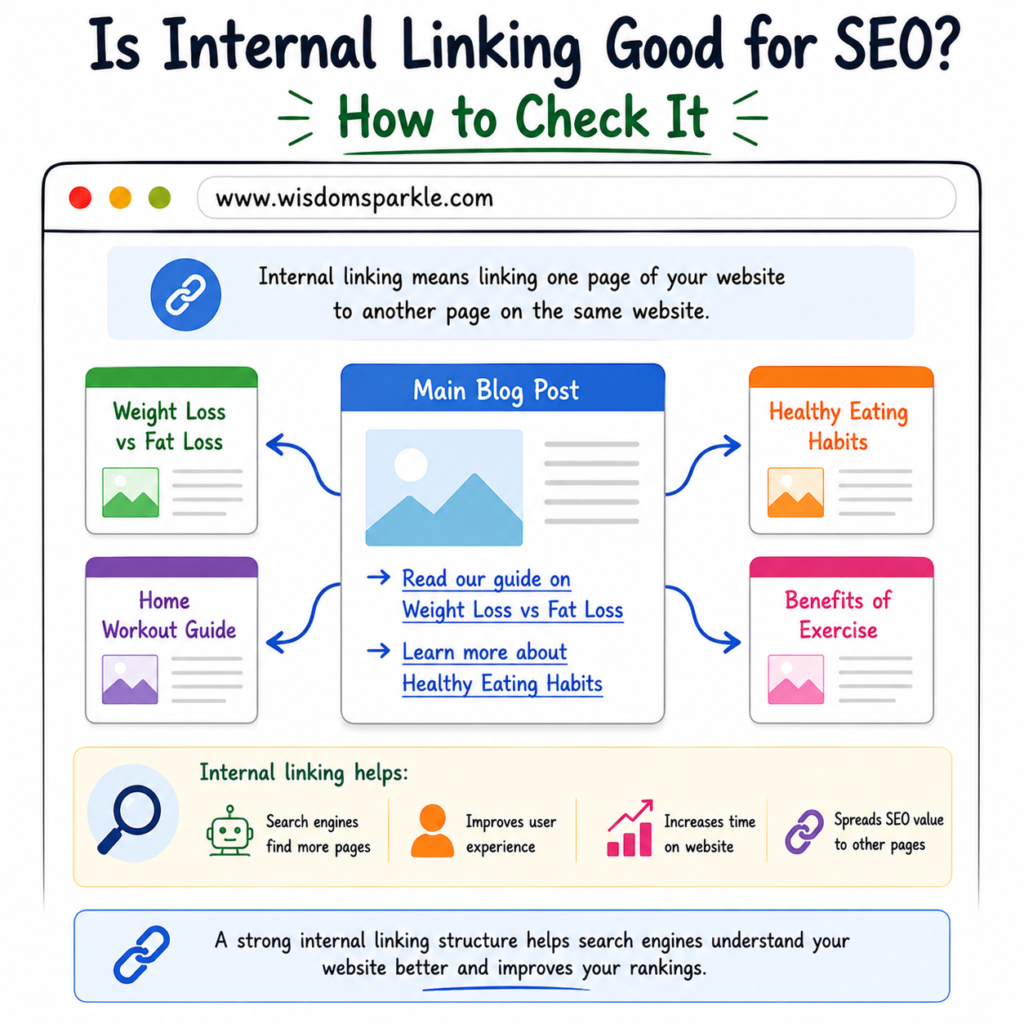
Internal linking means linking one page of your website to another page on the same website.
For example, suppose you have a blog about fitness.
In one article, you mention weight loss. You can add a link to another article on your website that explains weight loss in detail.
Example:
“Want to learn more? Read our guide on Weight Loss vs Fat Loss.”
This link connects two pages on the same website. That is called an internal link.
Is Internal Linking Good for SEO?
Yes, internal linking is very good for SEO.
Search engines like Google use internal links to understand your website and discover your pages.
Without internal links, some pages may be difficult for search engines to find.
Internal linking helps search engines move from one page to another and understand how your content is connected.
Because of this, internal linking can help improve rankings and visibility.
Benefits of Internal Linking
Helps Search Engines Find Pages
Google discovers content by following links.
When you add internal links, search engines can find more pages on your website.
This increases the chances of those pages appearing in search results.
Improves User Experience
Visitors often want more information.
Internal links help them find related content easily.
Instead of leaving your website, they continue exploring other pages.
Increases Time on Website
When users click internal links, they visit more pages.
This can increase the amount of time they spend on your website.
Spreads SEO Value
Some pages on your website may receive more traffic than others.
Internal links help pass value from stronger pages to newer or less popular pages.
Helps Organize Content
Internal links show the relationship between different topics.
This helps both users and search engines understand your website structure.
What Does a Good Internal Link Look Like?
A good internal link should be relevant.
For example, if you are writing about skincare, linking to another skincare article makes sense.
Example:
✅ Good:
“Read our guide on How to Get Glowing Skin Naturally at Home.”
❌ Bad:
Linking a skincare article to an unrelated topic like car maintenance.
Always make sure the linked page is related to the content.
How to Do Internal Linking in an Easy Way
Many beginners think internal linking is complicated.
Actually, it is very simple.
Follow these steps.
Step 1: Open Your Article
Start with the article you are editing.
Read through the content carefully.
Look for words, topics, or phrases that relate to other articles on your website.
Step 2: Find Related Content
Check your website for articles connected to the topic.
For example:
If your article is about fitness, you may have related posts such as:
- Benefits of Exercise
- Weight Loss Tips
- Healthy Eating Habits
- Home Workout Guide
These articles can be linked together naturally.
Step 3: Select Relevant Text
Choose words that describe the linked page.
For example:
Instead of:
“Click here.”
Use:
“Read our complete Home Workout Guide.”
This helps users understand where the link will take them.
Step 4: Add the Link
Highlight the text.
Click the link option in your website editor.
Paste the URL of the related article.
Save the changes.
That’s it.
You have created an internal link.
How Many Internal Links Should You Add?
There is no fixed number.
The goal is to help users.
For most blog posts, adding 3 to 10 relevant internal links is usually enough.
Avoid adding links just for the sake of adding them.
Every link should provide value.
How to Check Internal Linking on Your Website
Now let’s learn how to check whether your internal linking is good.
Method 1: Read Your Article
The easiest method is manual checking.
Open your article and ask yourself:
- Does it link to related content?
- Are the links useful?
- Do they help readers learn more?
If the answer is yes, your internal linking is probably working well.
Method 2: Use Google Search
You can check indexed pages using Google.
Type:
site:yourwebsite.com keyword
Example:
site:yourwebsite.com fitness
Google will show pages related to that topic.
You can then connect those pages through internal links.
Method 3: Use SEO Plugins
If you use WordPress, SEO plugins often help identify internal linking opportunities.
Many plugins suggest related articles while you are writing content.
This makes internal linking much easier.
Method 4: Check Orphan Pages
An orphan page is a page that has no internal links pointing to it.
This means users and search engines may have difficulty finding it.
Look through your website and make sure every important page receives at least one internal link.
Common Internal Linking Mistakes
Let’s look at mistakes beginners often make.
Adding Too Many Links
Too many links can confuse readers.
Keep links useful and natural.
Using Generic Anchor Text
Avoid phrases like:
- Click here
- Read more
- Learn more
Instead, use descriptive text.
Example:
“Read our complete guide on healthy eating habits.”
Linking Unrelated Pages
Only connect pages that share a logical relationship.
Random links can hurt user experience.
Ignoring Old Articles
Many people add links only to new posts.
Go back and update older articles with links to newer content.
This helps create a stronger website structure.
Easy Internal Linking Example
Imagine you own a health website.
You have these articles:
- What Is Fitness and Why Is It Important?
- Weight Loss vs Fat Loss
- Simple Habits That Can Improve Your Health Every Day
- Physical Activity and the Heart
Now you can link them together.
In the fitness article, link to:
- Weight Loss vs Fat Loss
- Physical Activity and the Heart
In the weight loss article, link back to:
- What Is Fitness and Why Is It Important?
This creates a network of connected content.
Both users and search engines benefit from this structure.
Best Practices for Internal Linking
Here are some simple rules to follow:
- Link only to relevant content.
- Use clear anchor text.
- Add links naturally.
- Update old articles regularly.
- Make sure important pages receive links.
- Check for broken links.
- Focus on helping readers first.
If you follow these basic practices, your internal linking strategy will be strong.
Final Thoughts
Internal linking is one of the easiest and most effective SEO techniques you can use.
It helps search engines understand your website, improves user experience, increases page views, and makes it easier for visitors to discover valuable content.
The best part is that you do not need advanced SEO knowledge to do it.
Simply find related articles, choose relevant text, and add links naturally within your content.
When checking internal links, make sure every important page is connected to other pages on your website and that the links make sense for readers.
Remember, good internal linking is not about adding as many links as possible. It is about helping visitors find useful information while creating a well-organized website that search engines can easily understand.
A few well-placed internal links can have a bigger impact than dozens of random ones. Start small, stay consistent, and your website’s SEO can improve over time.